How to mic a cab: the easy way that always works
Miking a cab can be tough. Without experience, it’s hard to know what to listen for, and it’s easy to end up with an unbalanced sound — or one that misses “the thing” the mix needs. Then you reamp over and over again, or reach for an amp-sim preset.
There’s nothing wrong with presets or amp sims, but you give up the chance to sound more unique. And there’s nothing wrong with reamping either — you learn something every time — but it is very, very time-consuming.
So here is a simple technique to mic a cab with a single microphone and get a good sound that doesn’t need a boatload of processing in the mix. It’s tailored for metal and rock, but it works for other styles too. And if you don’t mic real cabs, you can select your IRs using the same principles.
What you need
- One microphone. I like a Shure SM57 for guitar cabs and a Sennheiser MD421 for bass cabs.
- A pink noise generator. Most DAWs come with one, and there are free ones out there.
- Headphones with a very flat frequency response, or a frequency analyser with a variable tilt setting. I prefer the analyser, since my headphones are open-back and don’t isolate much.
- Optional: a clean power amp.
How it works
-
Find a place in your room where you like the sound of your amp. Set all controls to noon, set the gain to taste and play some riffs. Move the cab around until you’re happy with the sound in the room. Every room and position changes your sound: bass builds up near corners, and a wall close in front of the cab can cause odd reflections.
-
Connect a clean power amp to the cab. If you don’t have one, turn down the master volume on your amp and set the power-amp controls (depth and presence) to noon, so the power amp colours the sound as little as possible.
-
Send pink noise to the power amp. On a guitar amp, use the FX return to bypass the EQ section. Some amps also have a direct power-amp input you can use.
-
Position the mic as close to the grille as possible without touching it, pointing straight at the centre of the speaker, then start moving it towards the edge.
-
Listen — or watch.
- Listen: with the mic at the centre you’ll hear a very bright, high noise. As you move towards the edge, the high noise gets quieter and a low noise gets louder. Stop right before the low noise becomes louder than the high noise.
- Watch: put a frequency analyser on the mic channel and set its tilt to 3 dB. You’ll see two bumps in the spectrum, one in the lows and one in the highs. Move the mic towards the edge and stop where both bumps peak at the same height.
Either way, that’s the spot with the most even frequency response for your combination of cab, mic and room.
-
Start tweaking your amp to taste and have fun recording or reamping.
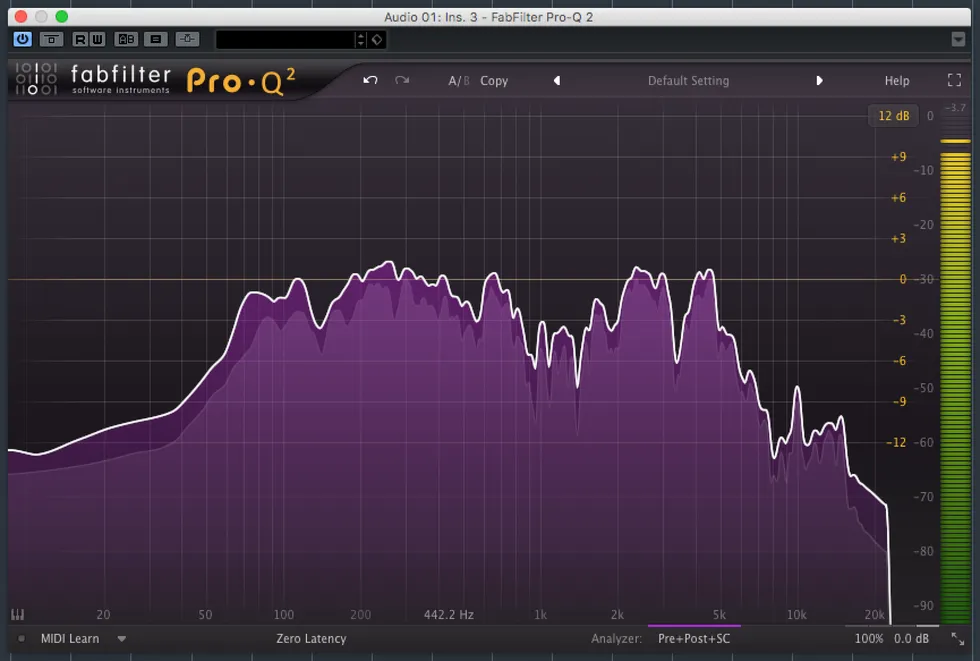
Both bumps visible: the low one from about 60 Hz to 900 Hz, the high one from 1.5 kHz to 6 kHz — peaking at the same height.
A few tips
- Start with everything at noon and tweak from there.
- Play it like you mean it. If you want to sound aggressive, play aggressively.
- Don’t rely on high gain settings. Drive the amp with your picking hand as much as possible.
Using the same technique to choose IRs
Put the pink noise generator first in the chain, followed by your favourite IR loader, then the frequency analyser. Now flip through your IR collection with the analyser open and keep the most even-looking ones.
The theory behind it
Pink noise. Pink noise (also called 1/f noise) has an amplitude that decreases as frequency increases. To the ear it sounds roughly equally loud across the audible spectrum.
How a speaker works. A typical speaker produces sound from the dust cap in the centre and the cone around it. The dust cap delivers the highs, the cone delivers the lows. This technique finds the spot where both are equally loud — which gives you an even frequency response.
Because pink noise falls by 3 dB per octave, set the analyser’s tilt to 3 dB to compensate. Otherwise it won’t look flat and you’ll get the wrong reference.
I hope this was helpful. Have fun recording and mixing!